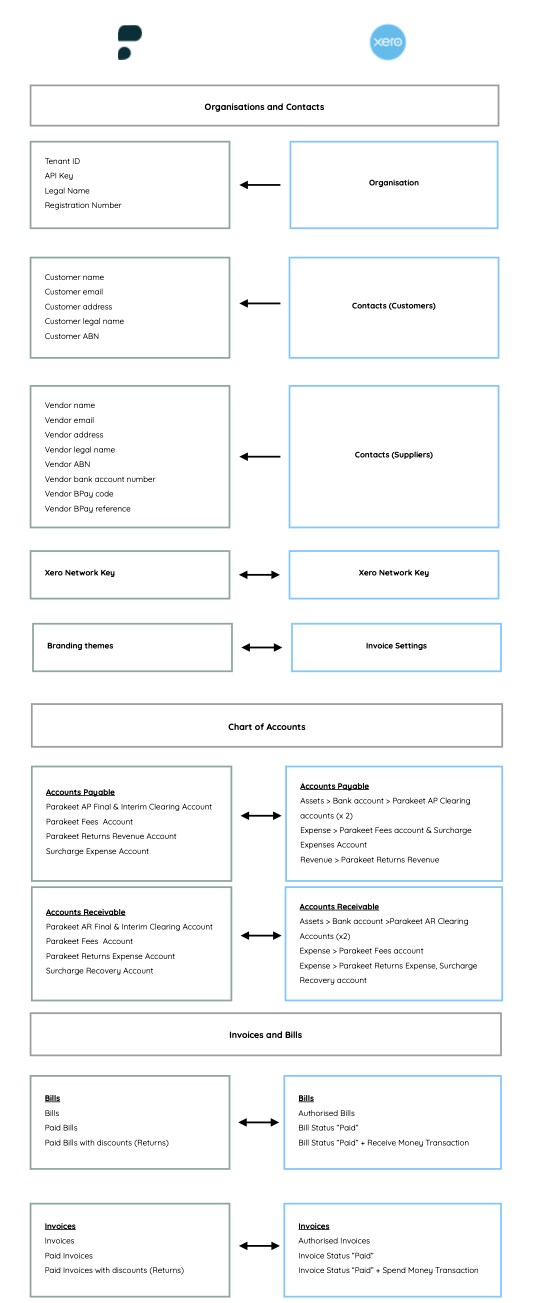
This is how data in Parakeet maps to Xero.
The arrow signifies the direction of the data flow between Parakeet and Xero.
Parakeet uses Xero as the source of truth for data coming into Parakeet, particularly the Contacts details in Xero.
The key details Parakeet uses from the Contacts sections are:
a) Legal Name
b) Trading Name
c) Email Address
d) ABN
e) Payment details such as Bank accounts, BPay details
It is important that Contracts details in Xero are kept up to date.
Was this article helpful?
That’s Great!
Thank you for your feedback
Sorry! We couldn't be helpful
Thank you for your feedback
Feedback sent
We appreciate your effort and will try to fix the article